
Business Profile
Your Business Profile is the single source of truth for your sub-account’s identity. The values you enter here flow into invoices, outbound emails, calendar invites, and any {{custom_values}} you reference across the platform. Getting it right once saves you from chasing the same details through dozens of templates later.
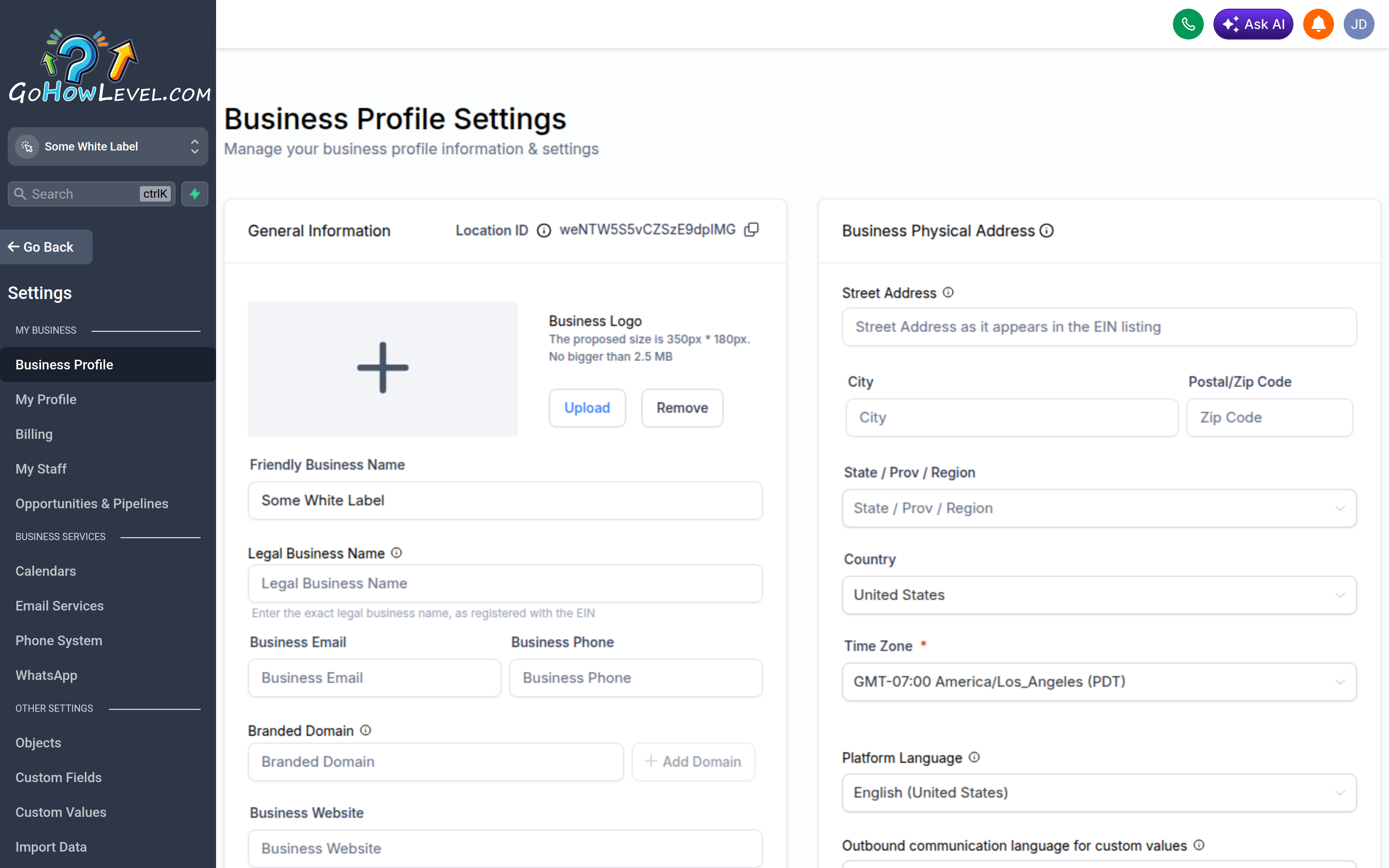
Your Business Profile holds the identity details that flow into invoices, emails, and calendars.
What’s stored here
Section titled “What’s stored here”The Business Profile lives in Settings → Business Profile. It typically holds:
| Field | Used for |
|---|---|
| Friendly Business Name | The display name customers recognize — used on emails, footers, and shared assets |
| Legal Business Name | Your registered name (as registered with the EIN) for invoices and formal documents |
| Business email | Reply-to address and notification routing |
| Business phone | Click-to-call, footers, contact blocks |
| Website | Links in emails, forms, and templates |
| Physical address | Invoices, email compliance footers, local SEO |
| Timezone | Appointment times, scheduling, automation timing |
| Logo | Branding on documents and shared assets |
Filling it in
Section titled “Filling it in”- Open Settings → Business Profile.
- Enter your Friendly Business Name (the display name customers see) and your Legal Business Name (your registered name, as registered with the EIN).
- Add your primary business email, phone number, and website.
- Enter your full physical address, including country and postal code.
- Set your timezone to the location where you operate.
- Upload your logo (use a high-resolution image).
- Save your changes.
Why timezone accuracy matters
Section titled “Why timezone accuracy matters”Your timezone is the anchor for every time-based feature. Calendars display open slots in this timezone, automations fire relative to it, and appointment confirmations show times based on it. If the timezone is wrong, customers may receive confirmations for the wrong hour and your team may see bookings shifted from reality.
Why address accuracy matters
Section titled “Why address accuracy matters”A complete, accurate physical address supports more than looking professional:
- Compliance. Marketing email regulations require a valid physical mailing address in your message footer. Your saved address can populate this automatically.
- Deliverability. Consistent, legitimate sender details help your emails reach the inbox instead of the spam folder.
- Invoicing. Customers expect a real business address on the documents they pay against.
Feeding custom values
Section titled “Feeding custom values”Many Business Profile fields are available as custom values you can drop into emails, texts, and templates — for example, your business name, phone, or address. Reference them as merge fields so that if a detail ever changes, you update it once here and every template stays current.
Keeping it current
Section titled “Keeping it current”Treat the Business Profile as a living record. If you move, rebrand, or change your main phone or email, update it here first. Because so many downstream features pull from these fields, a single accurate update here ripples cleanly through your invoices, calendars, and communications.